ZSM Client SDK Overview
This document covers the installation and use of the ZSM Client SDK to integrate Universal Multi-Factor Authentication into your application.
Universal Multi-Factor Authentication (UMFA)
Universal Multi-Factor Authentication (UMFA) provides a secure silent second factor using ZSM cryptographic device binding via a simple implementation model requiring two steps:
- Make an authentication call following your normal login process
- Verify the token that is returned from the authentication call.
Ideem handles all of the server infrastructure for Universal Multi-Factor Authentication (UMFA), which is architected to serve high transaction volumes on a global scale.
The UMFAClient class exposes these interfaces:
checkEnrollment()
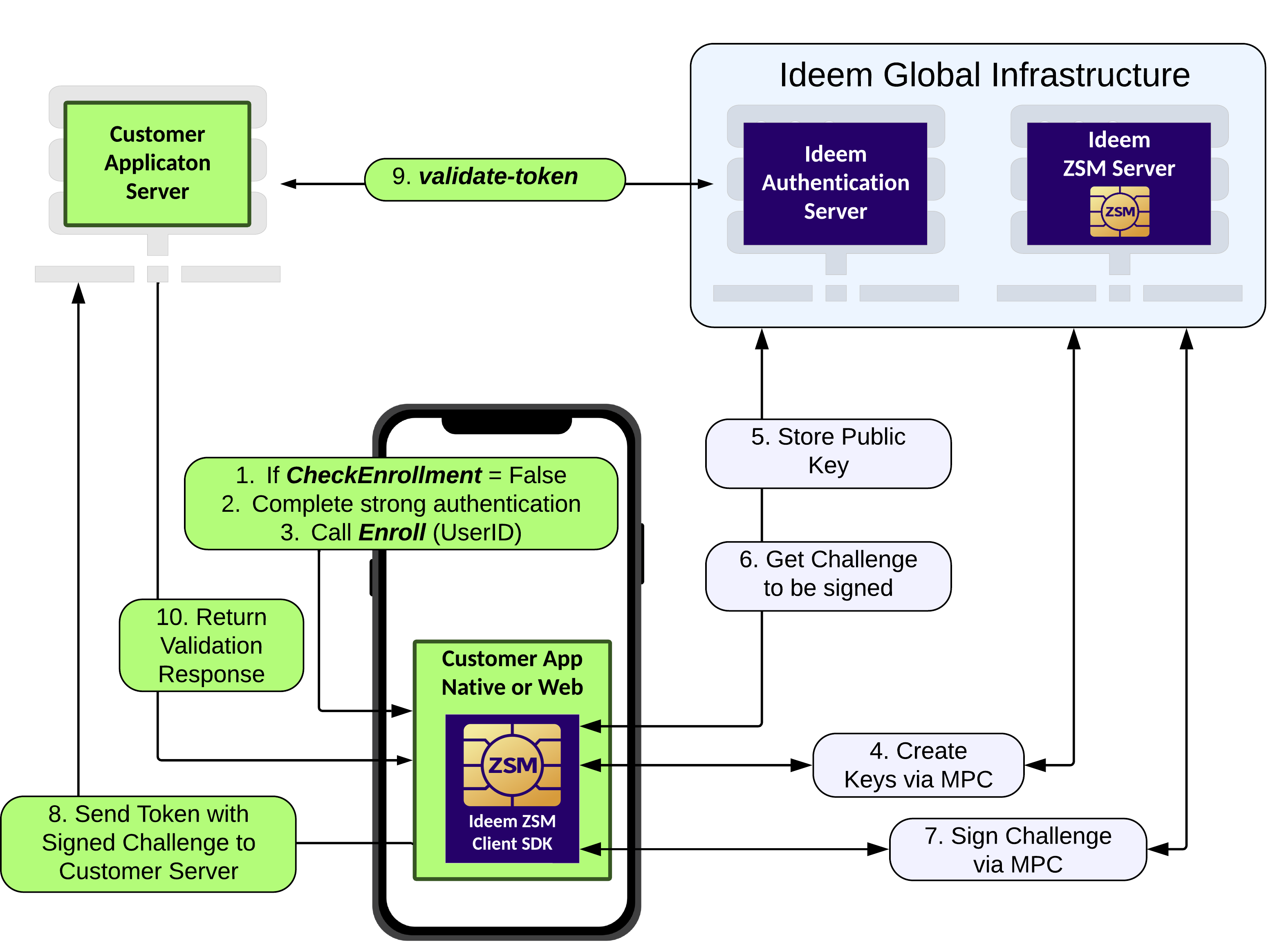
checkEnrollment() checks if an end user already has a ZSM credential registered on the device to facilitate silent re-authentication. This affords developers the ability to ascertain if the user needs to be enrolled in the UMFA process, or if they can initiate a silent re-authentication of the active user without requiring them to re-enter their credentials.
enroll()
enroll() the consumer in the UMFA process. This process binds the consumer to their device using ZSM cryptographic device binding. The enrollment process should be initiated only after the consumer has successfully authenticated using their primary authentication method.
authenticate
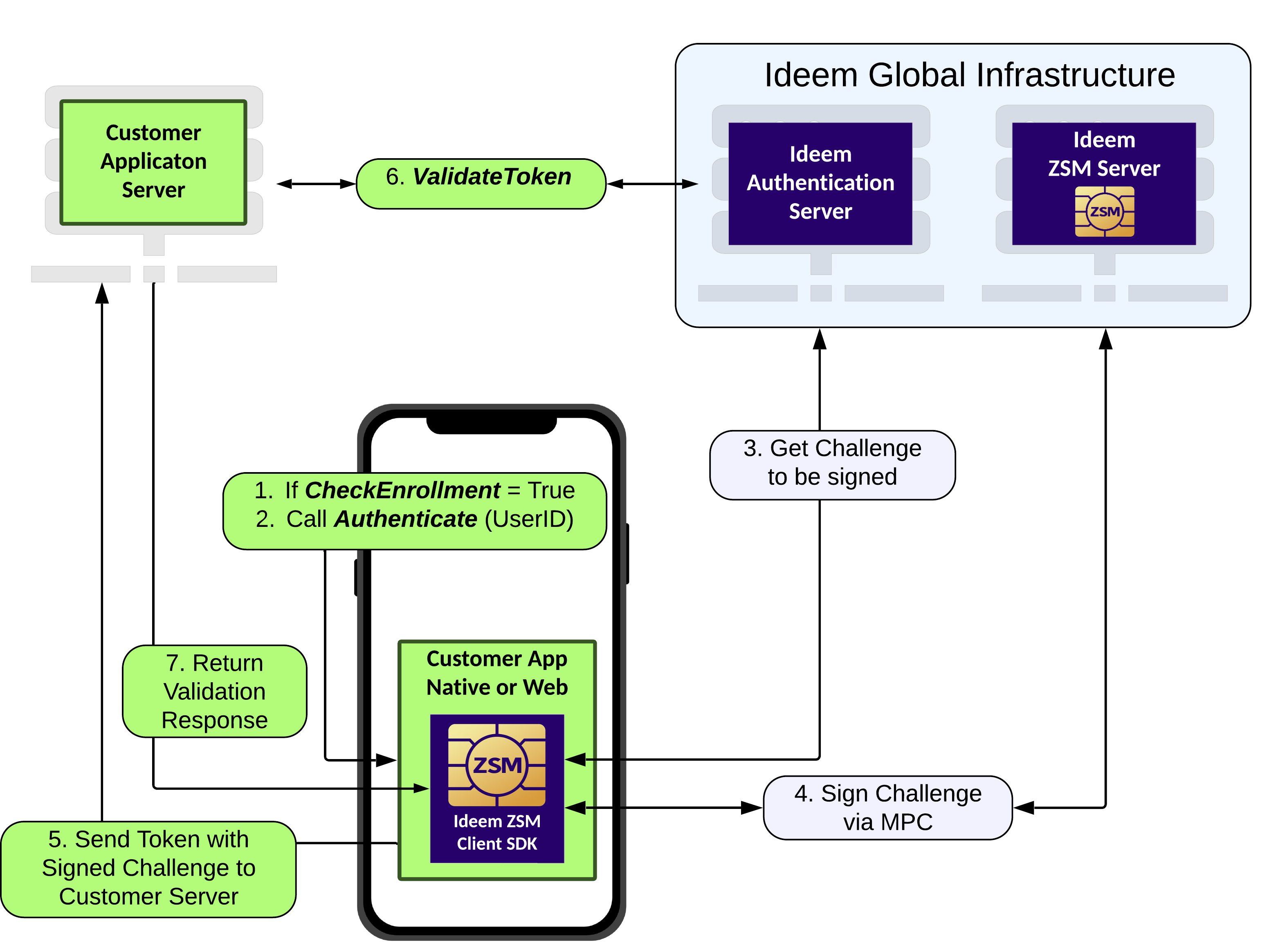
authenticate() executes the UMFA process, dynamically loading and executing the ZSM authentication module, and obtaining an token upon successful completion. This token should be retained at the session level on the server, enabling a server-to-server API call to the Ideem Authentication Server for out-of-band validation.
Validation of the token returned from enroll() and authenticate()
The validation process confirms the validity of the token returned from the UMFAClient.enroll() and UMFAClient.authenticate() methods, providing confidence in its authenticity and to guarantee it has not been tampered with. Validation takes place by means of a server-to-server call to Ideem's Authentication Server, during which the token is passed as input to the endpoint. Note that this validation can be initiated only server-to-server, to ensure no client-side tampering is possible, and to guarantee a secure and reliable verification of the token.
Here is a high level view of the call flow for UMFA Enroll, with out-of-band token validation:
Here is a high level view of the call flow for UMFA Authentication, with out-of-band token validation:
API Versioning and Backward Compatibility
Ideem uses semantic versioning of its APIs. Semantic versioning is an industry standard approach around how API versions are named. It defines a version number in the format of X.Y.Z where X, Y, and Z are the major, minor, and patch versions.
In practicality, Semantic Versioning is implemented on a spectrum of strictness. We take a flexible approach in the following way:
- We only increase the major version for changes of a significant breaking nature. If this version number changes, significant changes must be made by all users of our API.
- We may increase the minor version for minor breaking changes instead of increasing the major version. We would only take such action when that change has a very limited scope and the impact has been discussed and agreed upon by the impacted parties. A concrete example of this is if we change a special feature used by one or two of our customers in a breaking way in conjunction with agreement from these impacted customers. But the change otherwise does not impact our overall customer base.
- In a strict interpretation, the patch version would only be increased for bug fixes. We may increase our patch version for minor new features or enhancements to existing features so long as these changes do not represent a breaking change.
Ideem will support the current and one prior major version of each API for a 24-month period, including all minor, and patch updates to those major versions.
Let's Get Started
In the following pages, you will learn how to:
- Add the ZSM Client SDK to your application project
- Use the interfaces for Universal Multi-Factor Authentication (UMFA).